Build Your Shopify Store
Build a store that converts, not one that looks impressive. Then run the Pre-Launch Checklist before spending your first dollar — skipping this is the #1 cause of beginner data disasters.
High-Converting Store Examples — Study These
Open each of these on both mobile and desktop. Study what's above the fold, how the offer is framed, where social proof sits, and how every element reduces friction. These are your reference points — copy the structure, not the product.
Example Product Page Screenshots
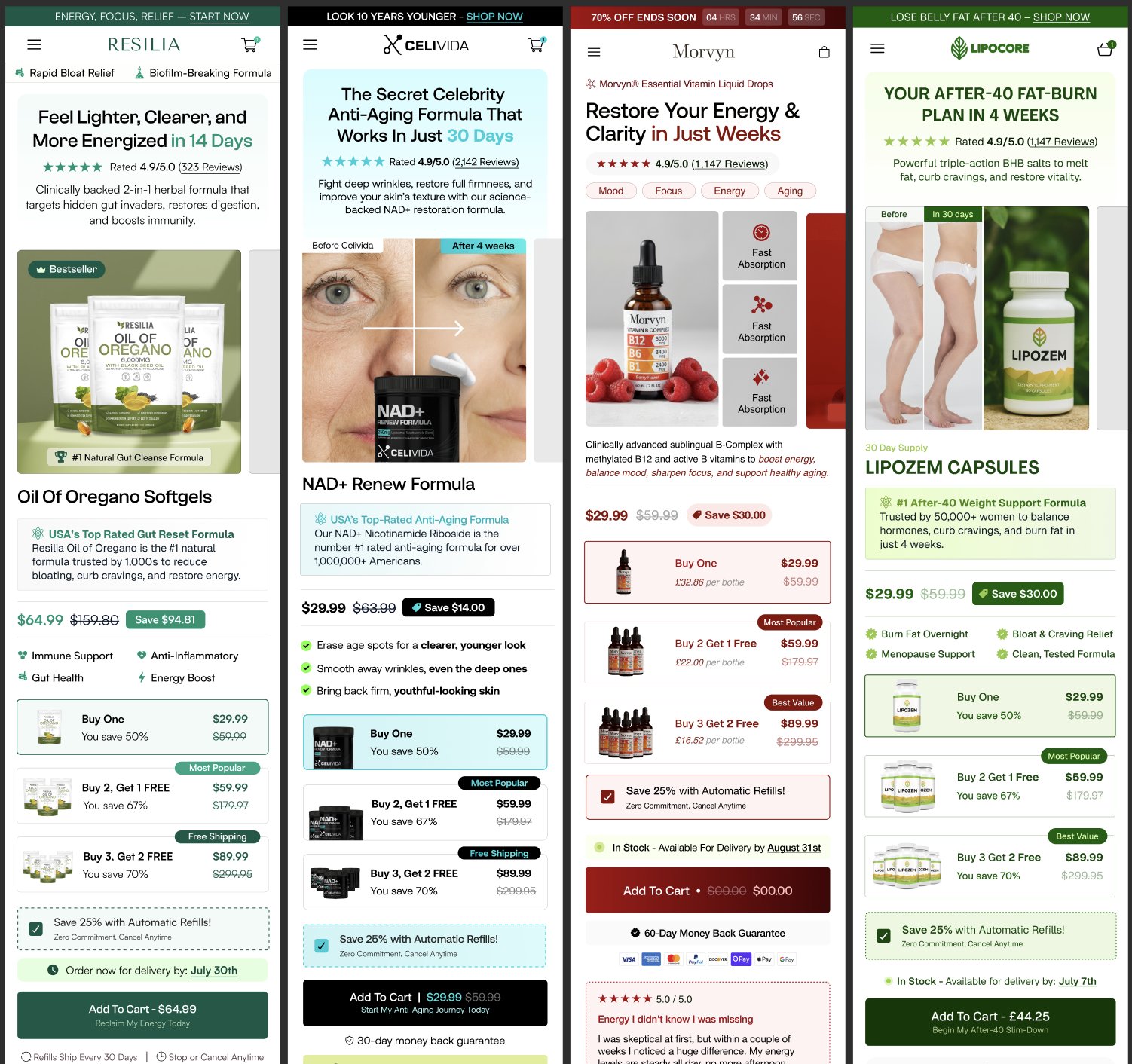
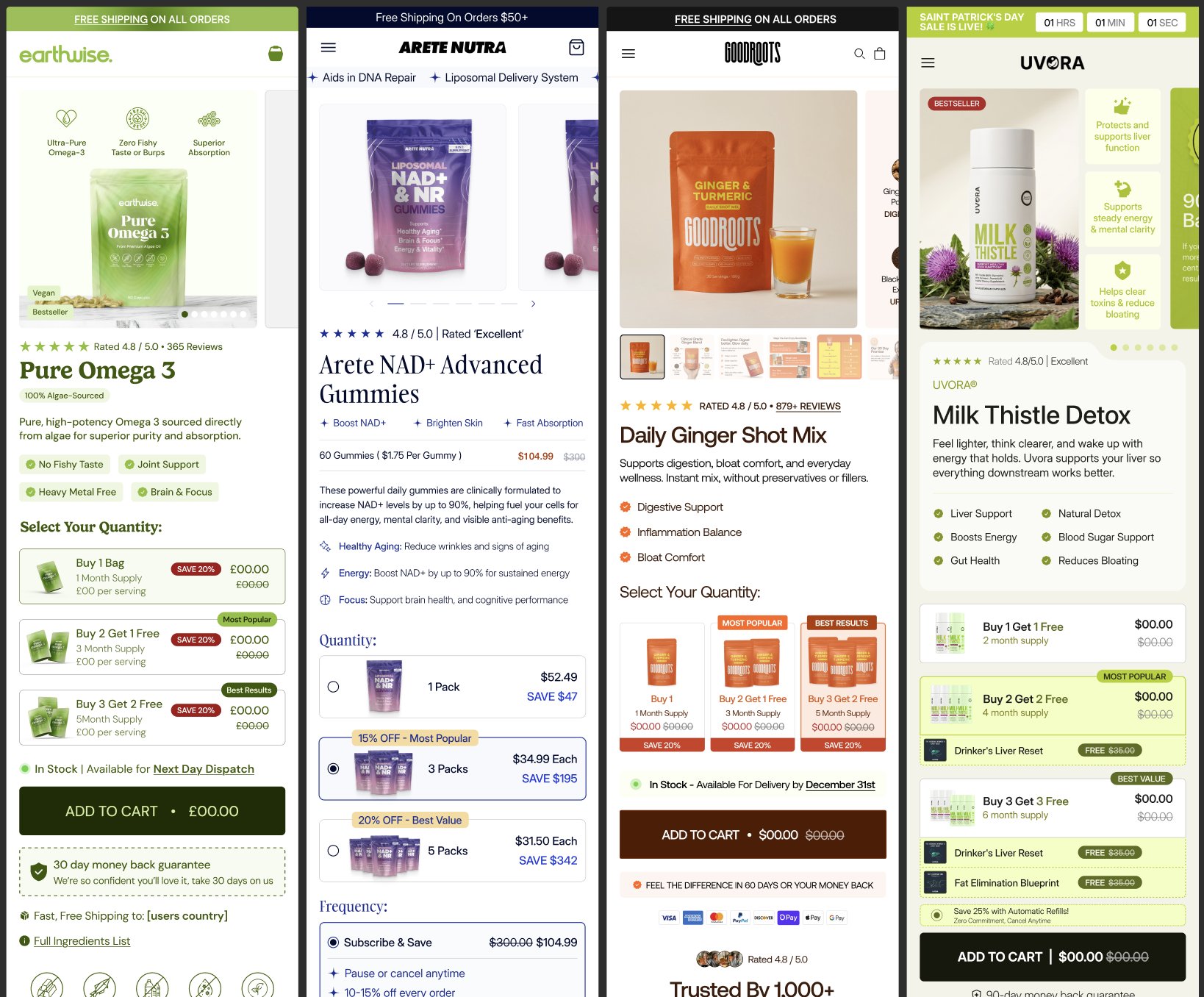
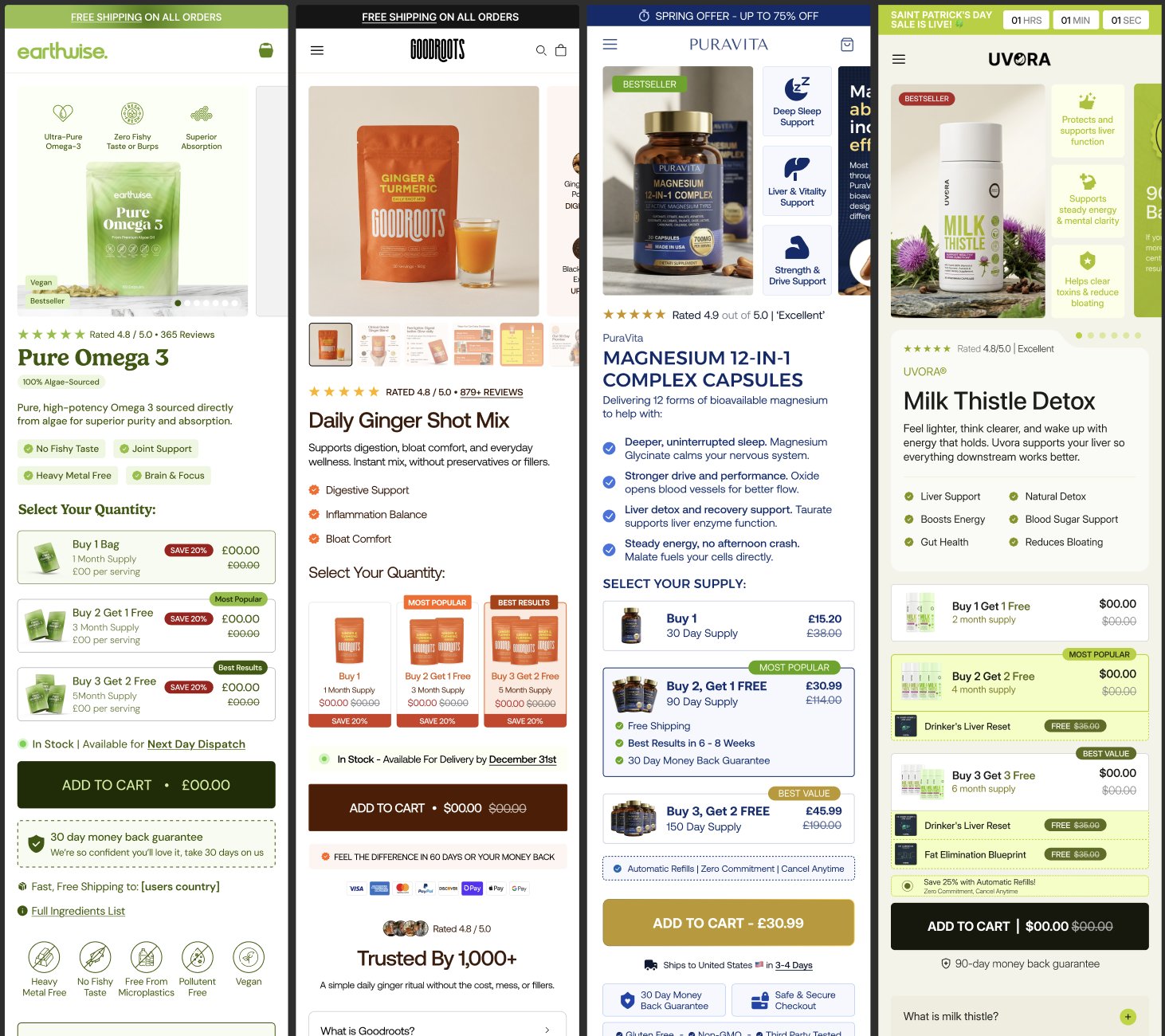
Click any image to zoom & enlarge →
Your store has one job: not lose the sale the ad already won. The ad does the persuasion. The product page confirms the decision. The checkout collects the money. If any of those three links break, you've wasted your ad spend. Optimize in that order.
"A better-looking store converts better." Not at the testing phase. A fast, functional, trustworthy store converts equally well to a beautifully designed one. The variables that move conversion rate: load speed, clear value prop above the fold, trust signals, payment options. None of those require design talent or expensive themes.
"I need a premium theme to compete." Dawn theme is free and converts as well as $300 premium themes for most test products. The operators seeing lift from premium themes are doing 100+ orders/day and testing CRO improvements on proven winners. At testing phase: Dawn. Period.
"More product page sections = more trust." More sections = more friction and slower load time. The product page should answer these questions in order: What is it? Does it solve my problem? Can I trust this? What do others say? How do I get it? Beyond that — remove, don't add.
"Reviews can wait until I have real customers." Wrong. Import 15–30 verified reviews from AliExpress via a reviews importer before your first ad dollar. Arriving at a zero-review store significantly reduces trust and conversion rate for cold traffic.
Your store's job at this stage: don't lose the sale the ad already won. Speed over perfection. A store that launches in 2 days gets real feedback. A store you polish for 3 weeks never does.
Store Setup — The Minimum That Converts
Shopify's free Dawn theme converts extremely well. Stop looking at $300 premium themes. The conversion difference between Dawn and a paid theme is nearly zero for beginners. Use Dawn, customize the colors and fonts, and launch. The community re-asks "which theme is best" 500+ times — the answer is always: the one you launch with.
Hero image → Headline (outcome, not feature) → Price with crossed-out anchor → Social proof bar (X,000 happy customers) → 3 benefit bullets → Add to Cart → Guarantee badge row → Reviews section → FAQ (kill the top 3 objections). Nothing else. Do not add sections because they look professional — add them only if they reduce friction or handle an objection.
Secure checkout badge. Money-back guarantee (60 days performs better than 30). Real contact email address. Privacy policy and terms pages. If your store doesn't have these, customers will leave on the checkout page even if they want your product.
Use Google PageSpeed Insights on your live URL. If you're above 3 seconds on mobile, your CVR is being destroyed before a single customer reads your offer. The fix: compress images (TinyPNG or Shopify's native optimizer), remove unused app scripts, and avoid video auto-play on the product page.
🧮 Break-Even ROAS Calculator
Know your number before you spend a dollar. Every kill/scale decision you make compares your actual ROAS to this number — not to a generic benchmark.
💡 Input your numbers above to see your break-even ROAS automatically.
⚡ Pre-Launch Checklist — Run This Before Spending $1
This single checklist would prevent the top 5 technical failures beginners experience on their first launch. Operators run into these issues again and again because nobody told them to verify before launching.
The full 12-item checklist below is the complete pre-launch sweep. These 6 are flagged because they're responsible for the majority of first-launch failures — pixel not tracking, PayPal missing, spending limits throttling delivery. If you're short on time, clear these first. All six must be yes before you run a single dollar of ads.
- Pixel + CAPI firing a Purchase event in Meta Test Events?
- Test order placed, payment processed, confirmation email sent?
- Shopify Payments + PayPal both live?
- Break-even ROAS calculated and written down?
- 30–50 ad creatives uploaded? (12 minimum)
- Ad account spending limit removed or set at 5–10× daily budget?
Go to Events Manager → Test Events → browse your store. Confirm PageView, AddToCart, InitiateCheckout, and Purchase events all fire. Do a test purchase. If Purchase doesn't fire, your data is garbage and your campaign will not optimize.
Without CAPI, iOS14+ privacy changes mean Meta misses 20–30% of your purchase events. Shopify's native Meta integration handles this. Enable it under Shopify → Sales Channels → Facebook & Instagram → Settings.
Break-even ROAS = Selling Price ÷ Gross Profit per Order. If you sell for $49 and your product costs $18 with $3 shipping, gross profit is $28, so BE ROAS = 49 ÷ 28 = 1.75×. Write this number down. Every scaling decision you make depends on it.
Minimum 3 angles × 4 ad formats. Ideally 30–50. The algorithm needs variety to find the creative that resonates with buyers. Launching with 2–3 creatives means you're making decisions based on insufficient signal.
Place a real test order on your own store. Confirm the checkout works on mobile. Check that payment is processed correctly. Verify the order confirmation email sends. One broken step here means every ad dollar you spend sends customers into a dead end.
A significant percentage of customers prefer PayPal. If you only have Stripe, you lose those sales. Enable both. While you're at it, enable Shop Pay — it can reduce checkout friction significantly for repeat Shopify customers.
Email 1 at 1 hour: "Did something go wrong?" Email 2 at 24 hours: reminder with product benefit. Email 3 at 72 hours: add 10% discount. This flow alone recovers 10–15% of abandoned carts for free. Set it up before you launch.
Test at pagespeed.web.dev. If mobile score is under 3 seconds load time, compress images and remove unused app scripts. Every additional second of load time costs you approximately 7% of conversions.
If your supplier ships in 7–14 days, say so. Do not hide shipping times. Customers who discover long shipping at checkout will abandon. Customers who know upfront and still buy will not complain. Surprise kills trust; transparency builds it.
Check Business Settings. Confirm your Business Manager is verified, your ad account spending limit is not set too low, and your payment method is active. A $50 spending limit will throttle your campaign before it can exit the learning phase.
If your ad says "Eliminate knee pain in 7 days," your product page must immediately confirm and deepen that exact promise. If the ad shows a blue product and the page shows green, you've broken trust. Creative → page congruence is often the silent CVR killer.
Before you run ads, place one order through your supplier. Check that the product matches photos, shipping time is as quoted, and packaging won't create customer service issues. Finding out your supplier's quality is bad after 50 customer orders is a disaster.
Before spending a single dollar on ads: place a test order on your own store. Verify checkout works, shipping cost matches your product page, the Meta Pixel fires a Purchase event, and your abandoned cart email triggers. This takes 20 minutes and prevents the most common launch failures. If you want a second set of eyes before you spend anything — drop it in the Discord and get eyes on it →
Your store is ready when:
- All 12 pre-launch checklist items are ticked
- Test order completed and confirmed end-to-end
- Pixel verified in Meta Events Manager (Purchase event fires)
- Page loads under 3 seconds on mobile

🧮 Use the Break-Even ROAS Calculator for this step →

Not sure if you're actually ready for this stage?
Get your free Readiness Score — 10 questions, 90 seconds, tells you exactly which gaps to close first.
